On April 20, 2026, the U.S. government published an update in the Federal Register titled “Extension of Compliance Dates for Nondiscrimination on the Basis of Disability; Accessibility of Web Information and Services.” At a glance, it might sound like a technical adjustment. In reality, it has very real implications for anyone who creates, manages, or shares digital content, especially PDF documents.
This post breaks down what’s going on, why it matters, and what you should actually do next if you work with PDFs.
The Big Picture: What Changed?
The rule in question is part of a broader effort to enforce digital accessibility under disability rights law. It focuses on making sure web content and digital services are usable for people with disabilities.
Originally, organizations were given a set timeline to meet accessibility standards. This new update pushes those deadlines further out.
In simple terms:
The government is not removing accessibility requirements
It is giving organizations more time to comply
The expectations themselves remain the same
That last point is the one many people miss. This is not a rollback. It’s a delay.
Why Accessibility Rules Exist in the First Place
Before getting into PDFs specifically, it helps to understand the purpose behind these rules.
Digital accessibility ensures that people with disabilities can:
Read online content using screen readers
Navigate websites without a mouse
Understand documents with clear structure and labeling
Access the same information as everyone else
Without accessibility, a PDF or webpage can become completely unusable for someone who relies on assistive technology.
Think of it this way: a beautifully designed PDF that looks perfect visually might be unreadable to a blind user if it lacks proper tagging.
Where PDFs Fit Into This
PDFs are one of the most common document formats used by government agencies, businesses, schools, and nonprofits.
They’re used for:
Reports
Forms
Policies
Applications
Contracts
Public notices
Because of that, they’re a major focus in accessibility enforcement.
The rule isn’t just about websites. It clearly includes documents that are shared online, and that means PDFs must meet accessibility standards too.
What Makes a PDF “Accessible”?
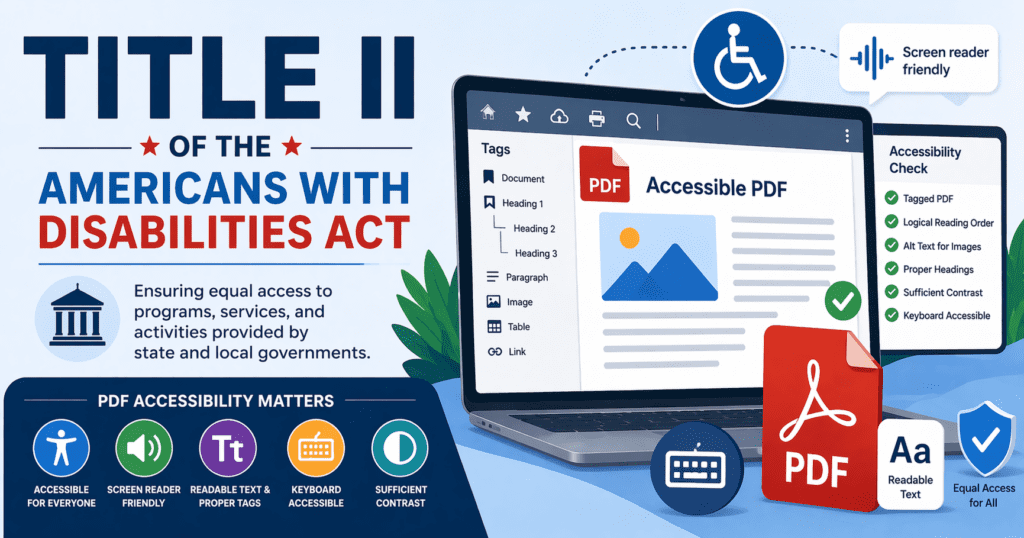
An accessible PDF is not just a document that opens correctly. It has to be structured in a way that assistive technologies can interpret.
Here are the core elements:
1. Tagged Structure
The document needs tags that define:
Headings
Paragraphs
Lists
Tables
Without tags, a screen reader sees a wall of text with no meaning.
2. Reading Order
Content must follow a logical sequence.
If the reading order is wrong, a screen reader might confusingly jump around the page.
3. Alternative Text for Images
Images need descriptions so users who can’t see them still understand their purpose.
Example:
Instead of “image1.jpg,” use “Bar chart showing a 20% increase in website traffic.”
4. Proper Use of Headings
Headings should be structured like an outline:
H1 for the main title
H2 for sections
H3 for subsections
This helps users navigate quickly.
5. Accessible Forms
If your PDF includes forms, users must be able to:
Tab through fields
Understand labels
Submit information without confusion
6. Color Contrast
Text must be readable for users with low vision.
Light gray text on a white background might look stylish, but it fails accessibility standards.
What the Delay Means for PDF Creators
At first glance, a deadline extension might feel like a reason to pause or delay work.
That would be a mistake.
Here’s why.
1. The Work Doesn’t Go Away
The requirements are still in place. You’ll still need to:
Audit your PDFs
Fix accessibility issues
Update your workflows
The only difference is when enforcement becomes stricter.
2. Backlogs Get Worse Over Time
Most organizations already have hundreds or thousands of PDFs.
Waiting means:
More documents pile up
Fixing them later becomes overwhelming
Costs increase significantly
Starting now spreads the effort over time.
3. Accessibility Is Not Just About Compliance
Even without legal pressure, accessible PDFs improve usability for everyone.
They:
Load better on mobile devices
Are easier to scan and read
Improve SEO when published online
Support a wider audience
Why the Government Extended the Deadline
The extension wasn’t random. It reflects real challenges organizations are facing.
Common issues include:
Lack of trained staff
Outdated document workflows
Legacy PDF archives
Limited budgets
Making PDFs accessible takes time, especially when starting from scratch.
The extension acknowledges that reality while still holding organizations accountable in the long run.
Common Mistakes People Still Make With PDFs
Even with more time, many organizations repeat the same errors.
Here are the most common ones.
“We’ll Fix It Later”
This is the biggest trap.
Accessibility is much harder to add after a document is created.
It’s far more efficient to build it in from the start.
“Our PDFs Look Fine”
Visual quality does not equal accessibility.
A document can look perfect and still fail every accessibility test.
“We Only Need to Fix New Documents”
Old documents still matter, especially if they are:
Frequently accessed
Required for compliance
Public-facing
Ignoring them creates legal and usability risks.
“We’ll Just Convert Everything Automatically”
Automated tools help, but they don’t solve everything.
They often miss:
Complex tables
Meaningful alt text
Logical structure
Manual review is always necessary.
What You Should Do Right Now
Instead of waiting for the new deadline, use this time wisely.
Here’s a practical plan.
Step 1: Audit Your Existing PDFs
Start by identifying:
High-traffic documents
Legally required documents
Frequently downloaded files
Focus on these first.
Step 2: Fix High-Priority Files
Work through:
Tagging
Reading order
Alt text
Headings
Even small improvements make a big difference.
Step 3: Update Your Workflow
Make accessibility part of the creation process.
For example:
Use accessible templates
Train staff on proper formatting
Export PDFs correctly from source files
Step 4: Train Your Team
Most accessibility issues come from a lack of awareness.
Training should cover:
Basic accessibility principles
How to create structured documents
How to test PDFs
Step 5: Use the Right Tools
Some tools can make the process easier:
Adobe Acrobat Pro (for tagging and fixing PDFs)
Accessibility checkers
Screen readers for testing
But tools alone are not enough. People need to understand how to use them properly.
How This Impacts Different Organizations
The delay affects different groups in different ways.
Government Agencies
They are under the most scrutiny.
Expect:
Increased audits
Public accountability
Legal pressure
Educational Institutions
Schools and universities rely heavily on PDFs.
Accessibility is critical for:
Course materials
Admissions documents
Student services
Businesses
Companies that provide digital services or public-facing content must also comply.
This includes:
Financial documents
Customer forms
Product information
Nonprofits
Many nonprofits overlook accessibility due to limited resources.
The extension gives them time, but expectations still apply.
The Legal Risk Is Still There
Even with extended deadlines, organizations can still face complaints.
Accessibility laws allow individuals to file claims if content is not accessible.
That means:
You don’t have to wait for the deadline to have a problem
Poorly accessible PDFs can still create risk today
The Opportunity Behind the Delay
Instead of seeing this as a delay, it’s better to see it as a window.
A chance to:
Build better systems
Clean up old documents
Improve user experience
Organizations that start now will be in a much stronger position later.
A Simple Example
Let’s say you publish a monthly report as a PDF.
An inaccessible version might:
Have no tags
Use images for text
Have unclear headings
An accessible version would:
Include proper structure
Allow screen reader navigation
Provide meaningful descriptions
The difference is not just technical. It changes whether someone can use the document at all.
Final Thoughts
The extension of compliance dates does not change the end goal. Digital content must be accessible, and PDFs are a big part of that requirement.
If you work with PDFs, this applies to you.
The four key takeaways are simple:
- Don’t wait.
- Use this time to fix what’s already there and improve how you create documents moving forward.
- Accessibility is not just a legal checkbox. It’s about making sure everyone can access the same information, regardless of how they interact with it.
- And when it comes to PDFs, that starts with structure, clarity, and intention from the very beginning.